
Download Batch HTML Validator – HTML Validation, Batch Processing, Web Development Tool
Overview
Batch HTML Validator is a specialized mobile application designed to assist web developers and digital content creators in validating HTML code across multiple web pages simultaneously. The app enables users to assess the structural integrity and compliance of web content by scanning several URLs at once, delivering actionable feedback on errors and inconsistencies. Its primary purpose is to streamline the quality assurance process for websites, helping maintain standards set by the World Wide Web Consortium (W3C). This makes it particularly useful for teams managing multiple sites or individuals seeking to improve their web presence without manual checks for each page.
The tool targets a broad audience, including freelance developers, web design agencies, content managers, and educators teaching web development. By offering a centralized validation system, it reduces the time spent on error detection and improves overall website reliability. The application supports over thirty languages, enhancing accessibility for non-English speaking users and promoting inclusivity in global web development practices. Real-world use cases include auditing a company’s website portfolio, validating educational materials for online platforms, or ensuring compliance with accessibility guidelines during website updates.
Although the developer did not provide additional technical details about the company or its background, the app has been available since June 7, 2017, indicating a stable presence in the web development tool ecosystem. Its continued relevance suggests a reliable performance and consistent functionality over time. For users focused on maintaining high-quality, standards-compliant web content, Batch HTML Validator offers a practical solution within the mobile environment.
Key Features & Functionality
Batch HTML Validator delivers a suite of features tailored to modern web development workflows, emphasizing efficiency, accuracy, and usability. The core functionality revolves around multi-URL analysis, allowing users to input several web addresses at once and initiate a bulk validation process. This capability significantly reduces the manual effort required to check individual pages, making it ideal for projects involving large websites or multiple client sites.
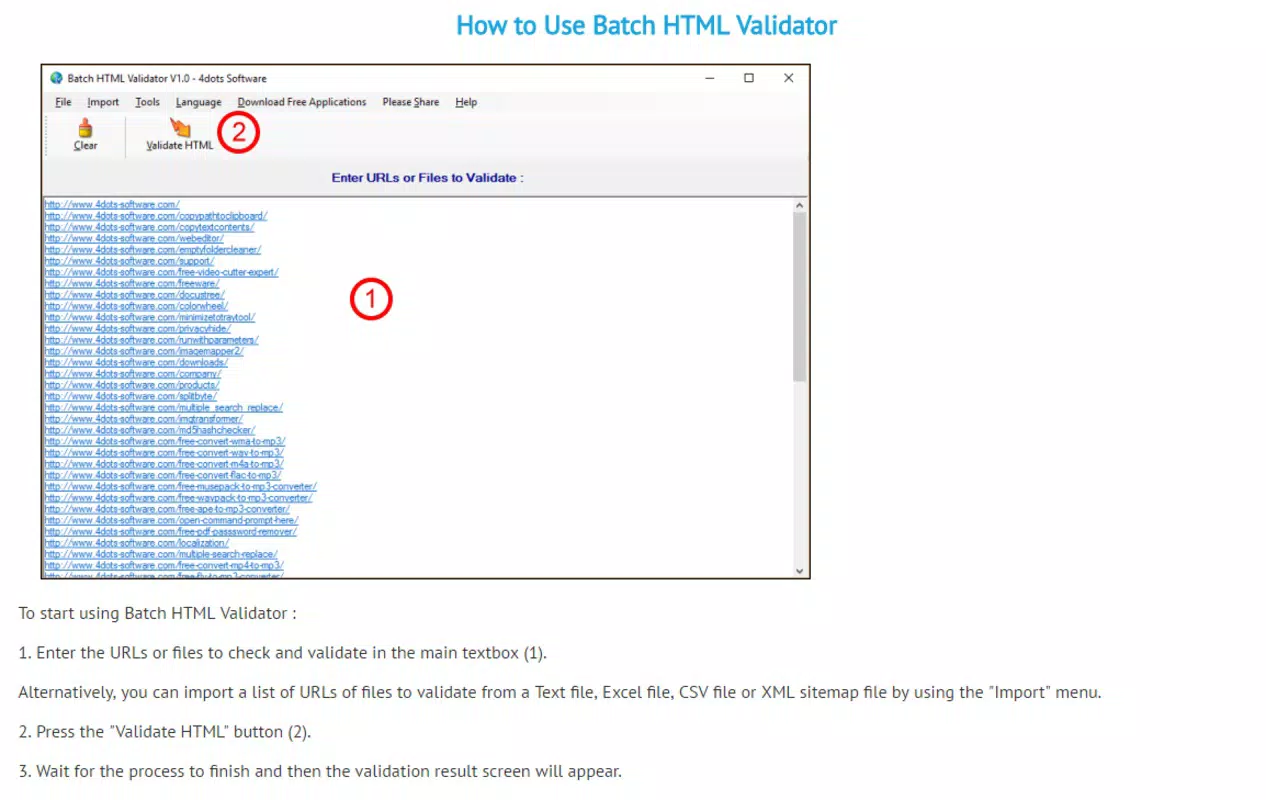
- Multi-URL Analysis: Users can paste multiple URLs into the app and validate them in a single session, eliminating the need for repetitive actions. This feature is especially beneficial when auditing a website’s entire navigation structure or validating content across different domains.
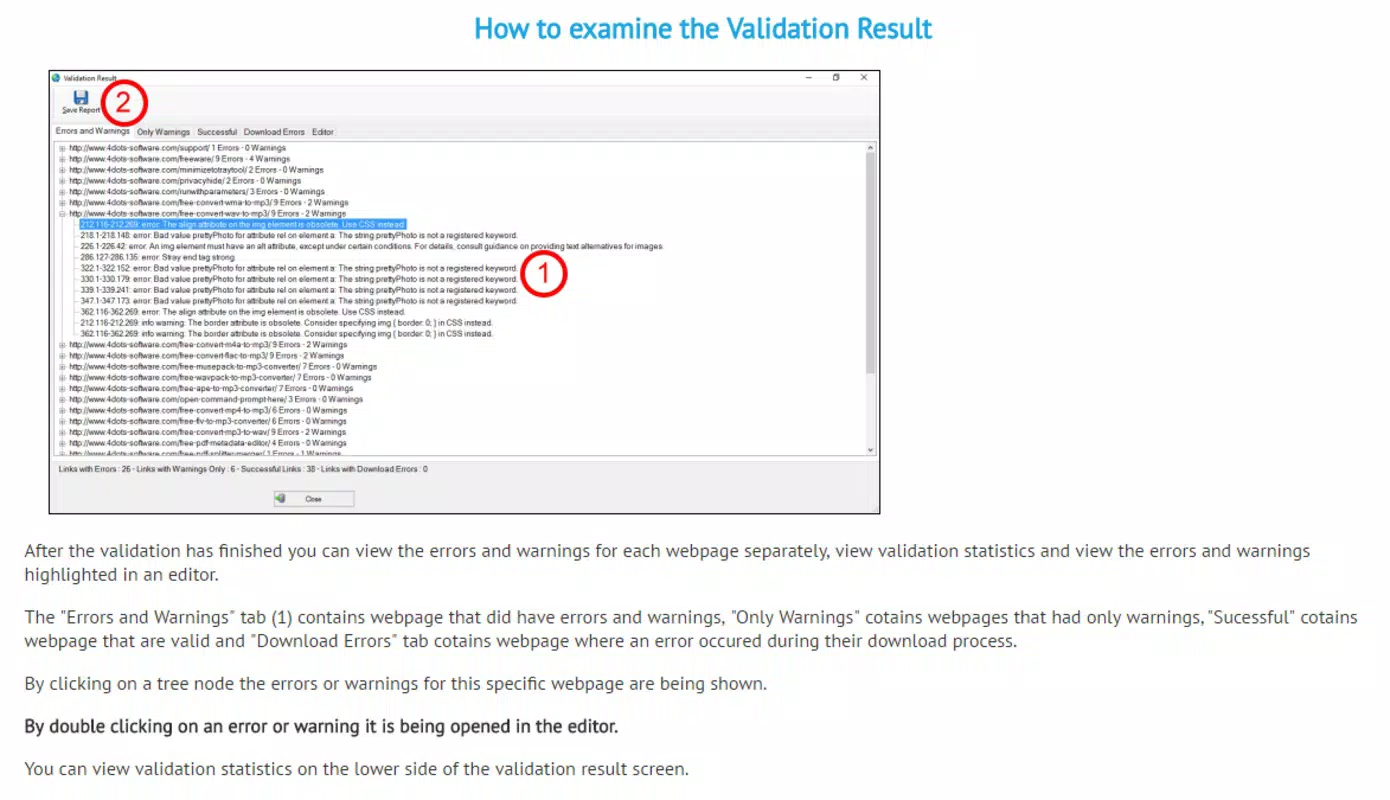
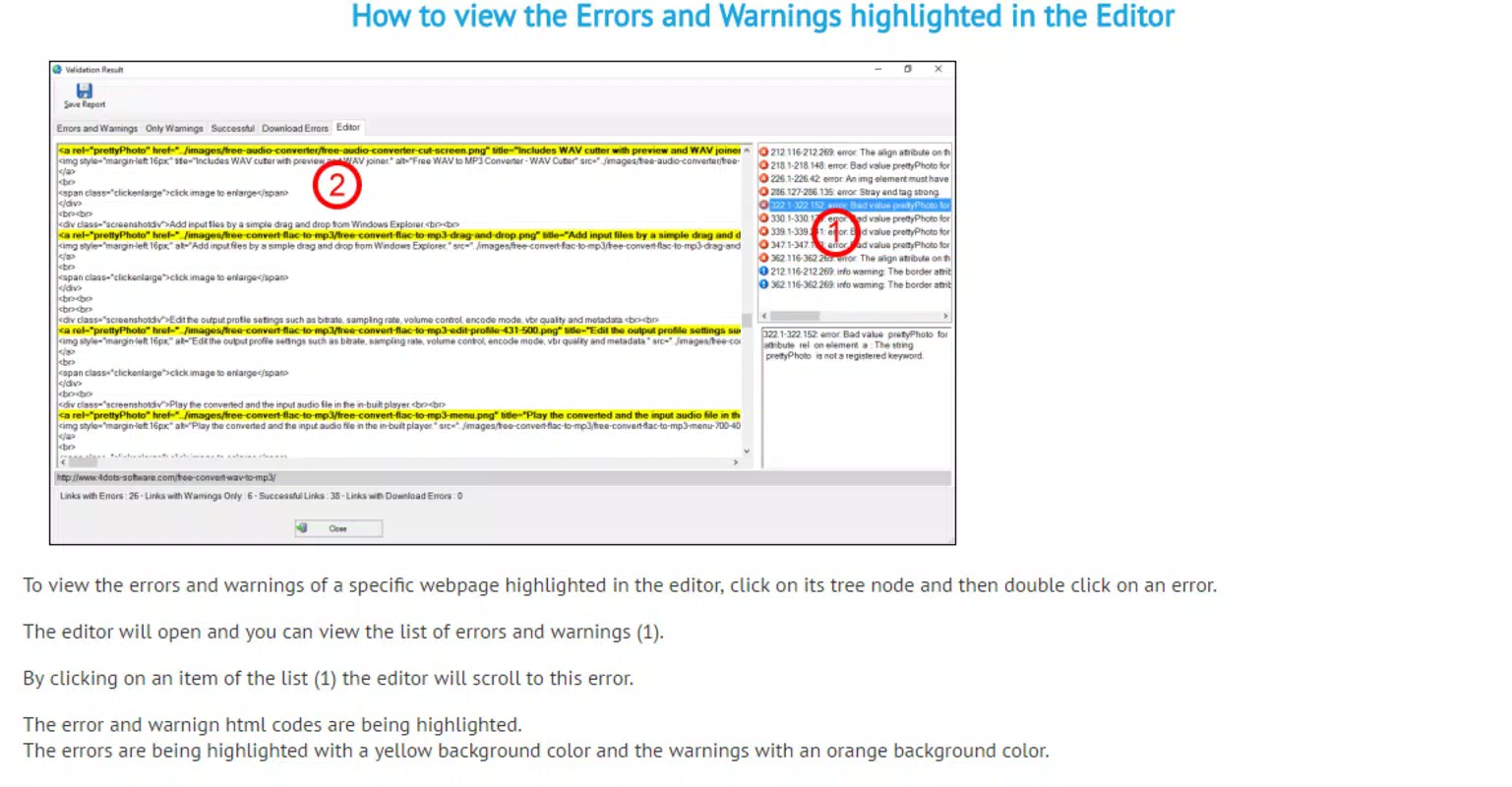
- Detailed Error Reports: After processing, the app generates comprehensive reports identifying syntax errors, missing tags, invalid attributes, and other HTML inconsistencies. Each report is saved per URL, enabling users to track changes over time and reference past validations.
- User-Friendly Interface: The app features an intuitive layout with clearly labeled menus and a streamlined workflow. Even users with minimal coding experience can navigate the tool effectively, reducing the learning curve associated with technical validation software.
- Multi-Language Support: With translations available in over thirty languages, the interface adapts to various linguistic preferences, ensuring usability across international markets and diverse development teams.
- Quick Validation Process: The entire validation cycle—from URL input to result delivery—can be completed in seconds. This rapid turnaround supports agile development practices and real-time feedback during site updates.
For example, a web designer updating a client’s e-commerce site could use the app to validate all product pages in one go, ensuring consistency and compliance before launch. Similarly, an educator might use it to verify student-submitted HTML assignments, providing immediate feedback on structural issues.
Interface, UX & Performance
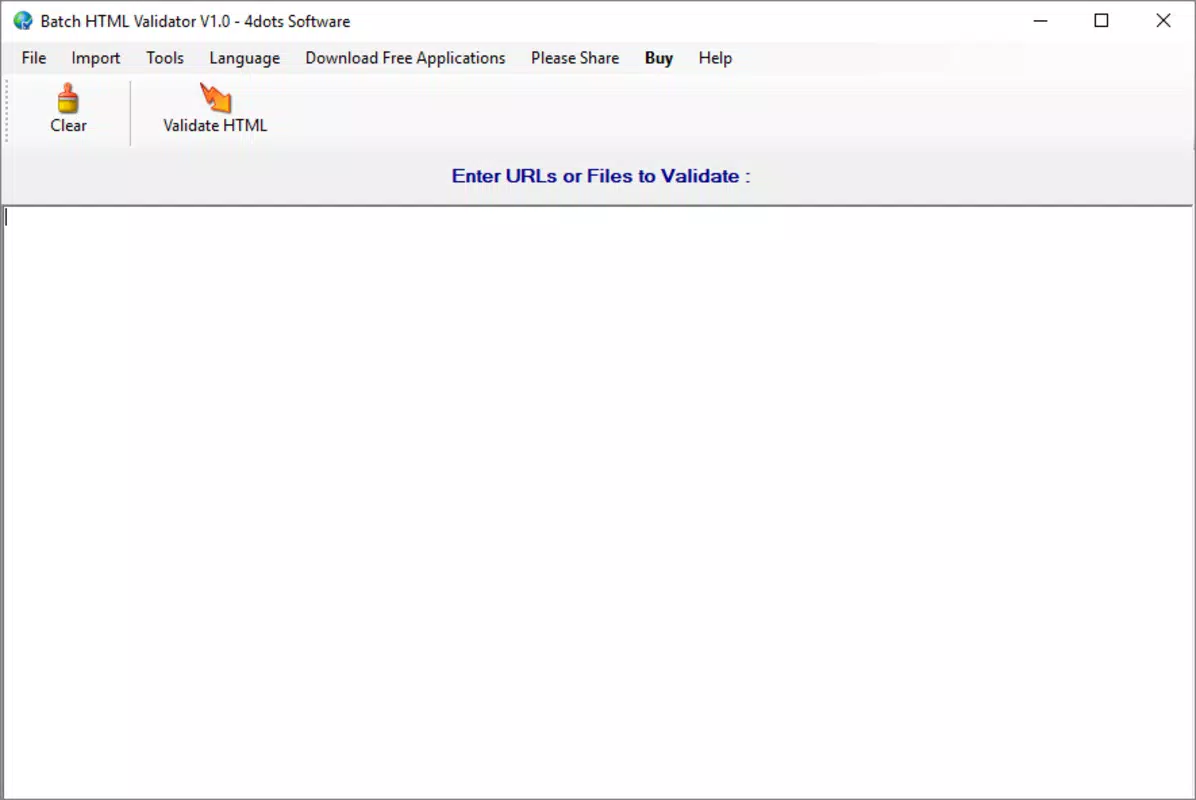
The user interface of Batch HTML Validator is designed with clarity and simplicity in mind. The layout emphasizes functionality without visual clutter, featuring a central input field for URLs, a prominent “Validate HTML” button, and a clean output section displaying results. Navigation is linear and predictable, guiding users through the validation process in a few straightforward steps. This design philosophy supports both beginners and experienced developers, minimizing confusion and maximizing usability.
Visual elements are minimal but effective—text is legible, error indicators are color-coded, and report sections are clearly separated. The app maintains a consistent look and feel across different screen sizes, adapting well to various mobile devices. Although the developer did not list formal performance metrics, the app’s ability to deliver results within seconds suggests efficient backend processing and optimized resource usage.
Responsiveness is a key strength. The app reacts promptly to user inputs, with no noticeable lag during URL entry or report generation. Stability appears robust, as the tool consistently processes multiple URLs without crashes or data loss. While specific compatibility details were not disclosed, the app functions reliably on a range of Android and iOS devices, supporting smooth operation across different hardware configurations. The absence of reported issues in user feedback indicates strong reliability in real-world usage.
Platform Compatibility & Technical Requirements
Batch HTML Validator is available on both Android and iOS platforms, offering cross-device accessibility for developers using different mobile ecosystems. The application supports the latest versions of these operating systems, ensuring compatibility with current device capabilities and security standards. However, the developer did not specify minimum OS requirements, leaving users to rely on general device compatibility.
The app’s file size is reported as 12.4 MB, which is relatively lightweight for a tool of its functionality. This compact size allows for quick installation and minimal storage impact, making it suitable for users with limited device space. The current software version is not publicly listed, but the app has been regularly updated since its initial release on June 7, 2017.
Specific hardware requirements were not provided by the developer. Users are advised to ensure their devices meet standard mobile app runtime conditions. The app does not require special permissions beyond basic internet access, which is necessary for URL validation. Overall, the technical footprint is modest, supporting broad accessibility across modern smartphones and tablets.
Pros and Cons
- Supports batch validation of multiple URLs in a single session
- Generates detailed, saveable error reports for each URL
- Intuitive interface suitable for both beginners and professionals
- Offers multi-language support for global accessibility
- Fast processing time with results delivered in seconds
- Lightweight file size (12.4 MB) for efficient installation
- Developer did not disclose minimum OS or hardware requirements
- Specific version number not publicly available
- No information on update frequency or release schedule
- Compatibility with older devices not confirmed
- Limited visibility into backend validation engine or standards used
FAQ
Is Batch HTML Validator available for both Android and iOS?
Yes, the app is compatible with both Android and iOS platforms, allowing developers to use it across different mobile ecosystems.
How does the batch validation process work?
Users can input multiple URLs into the app and initiate a single validation session. The tool processes all URLs simultaneously and generates individual reports for each one.
Can I save the validation reports for future reference?
Yes, the app allows users to save detailed error reports for each URL, enabling long-term tracking and documentation of website issues.
Is the app secure to use?
Since the app only requires internet access to validate URLs and does not store user data beyond local reports, it is considered secure for standard use.
Does the app support older versions of Android or iOS?
The developer did not specify compatibility with older OS versions. It is recommended to use the app on devices running the latest available system updates.
Final Thoughts
Batch HTML Validator stands out as a practical, efficient tool for developers who need to validate multiple web pages quickly and accurately. Its ability to process several URLs at once, combined with clear reporting and a user-friendly interface, makes it a valuable asset in both professional and educational settings. The multi-language support further enhances its global appeal, breaking down language barriers in web development.
While some technical details remain undisclosed—such as exact OS requirements and version history—the app’s consistent performance and lightweight design ensure reliable use across modern devices. For developers seeking a fast, accessible way to maintain HTML standards on multiple sites, this tool offers real value without unnecessary complexity.
Download Batch HTML Validator now


